VectrixLab
Back to work
  • Live production
  • Product concept

Prismforge

A visual production workspace connecting stage looks, lighting cues and rehearsal feedback.
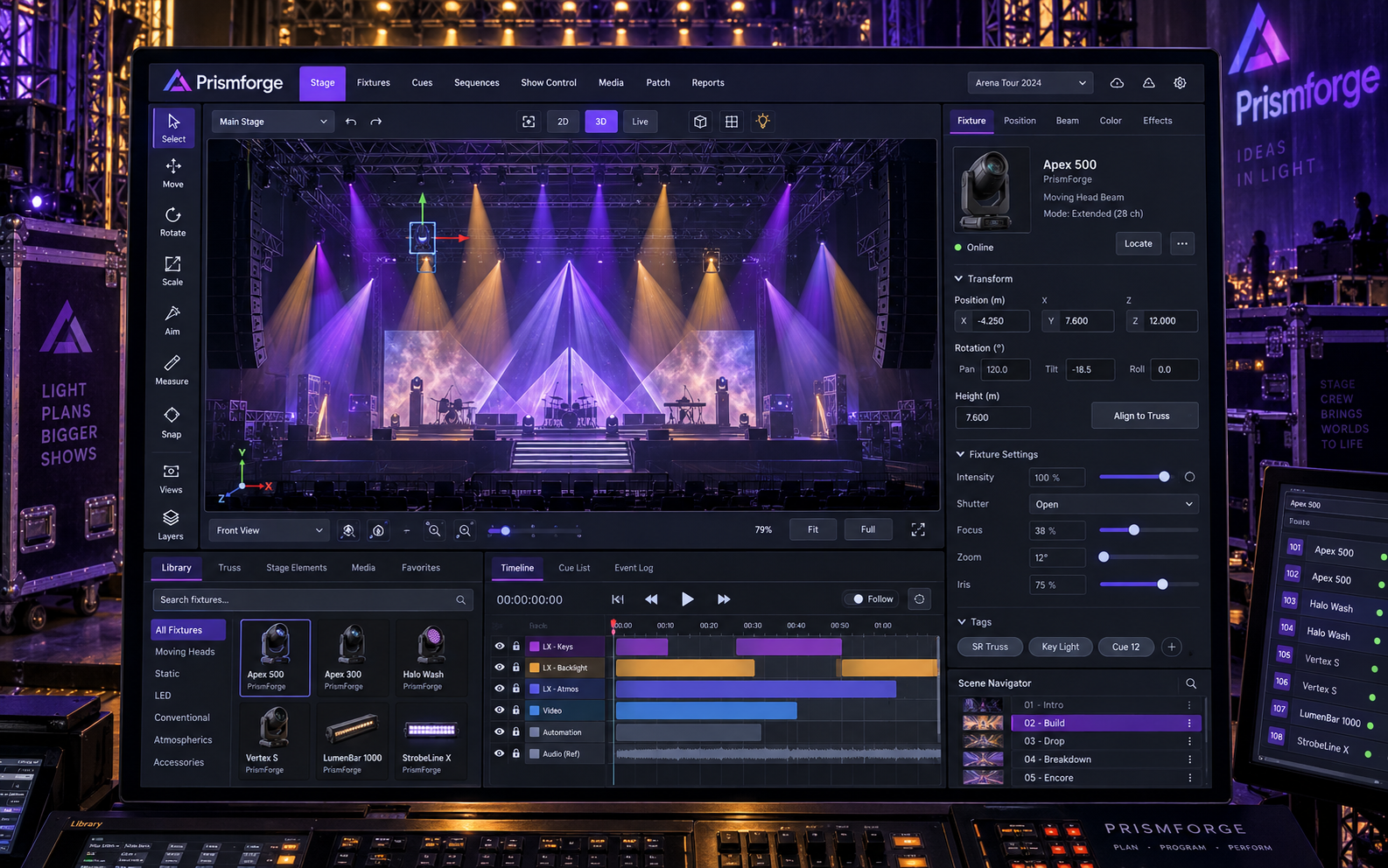
Prismforge product concept in a branded setting

Project overview

Prismforge explores the handoff between a lighting designer's visual intent and the production team's show documentation. Instead of opening on business metrics, the workspace opens on the stage itself. Designers can inspect a look, follow its cue sequence and review the notes that explain a change. The concept covers planning and collaboration rather than live equipment control.

The challenge

A show is revised in fragments: a fixture moves, a cue changes and a rehearsal note arrives after the original discussion. When those fragments live in separate documents, the team can lose the relationship between the intended stage picture and its latest revision.

  • Keep visual intent connected to cue documentation.
  • Make fixture assignments legible without hiding the stage context.
  • Anchor rehearsal feedback to a specific scene and version.

Our solution

A docked production workspace gives each activity its own visual grammar. Stage planning uses a canvas and inspector, cue planning uses a timeline, fixture assignments use a dense table and rehearsal review uses positioned annotations.

  • Stage canvas: Compose a stage look with fixture selection, positioning controls and a visual inspector.
  • Cue sequence: Arrange scene cues on a multitrack timeline and inspect the selected transition.
  • Fixture patch: Review fixture assignments in a dense table with grouping and selection tools.
  • Rehearsal review: Discuss numbered stage annotations alongside rehearsal notes and scene references.

Key features

  • Stage canvas

    Compose a stage look with fixture selection, positioning controls and a visual inspector.

  • Cue sequence

    Arrange scene cues on a multitrack timeline and inspect the selected transition.

  • Fixture patch

    Review fixture assignments in a dense table with grouping and selection tools.

  • Rehearsal review

    Discuss numbered stage annotations alongside rehearsal notes and scene references.

  • Look presets

    Organize reusable visual directions for scenes.

  • Cue properties

    Inspect timing labels and transition notes beside a selected cue.

  • Fixture groups

    Group equipment references by stage position.

  • Version history

    A proposed history view records design revisions.

  • Review assignments

    Route rehearsal notes to the responsible collaborator.

  • Show documentation

    A proposed export destination gathers approved planning records.

  • Scene navigation

    Move between acts and scenes without leaving the workspace.

  • Reference attachments

    Keep visual references beside the stage look.

Technology stack

    The results

    The four-view concept establishes a production-specific design language: charcoal canvases, precise technical panels and violet highlights. A useful next evaluation would ask a designer to locate a changed cue and trace the related rehearsal feedback.

    • 4Specialized concept views

    • 12Proposed feature areas

    Ready to build something similar?

    Let's bring your idea to life

    Whether it's a platform for your industry or something completely different, we can help you build, integrate and scale.